


★ 5.0 on Google · No long contracts · You own every asset
Rathly

Google Business Profile optimization

We manage your Google Business Profile every week. Categories, services, photos, posts and review replies stay current, and a grid scan shows where you rank around each location.

  • ✓Primary category, description and services
  • ✓Posts and photos every week
  • ✓Review requests and reply drafts
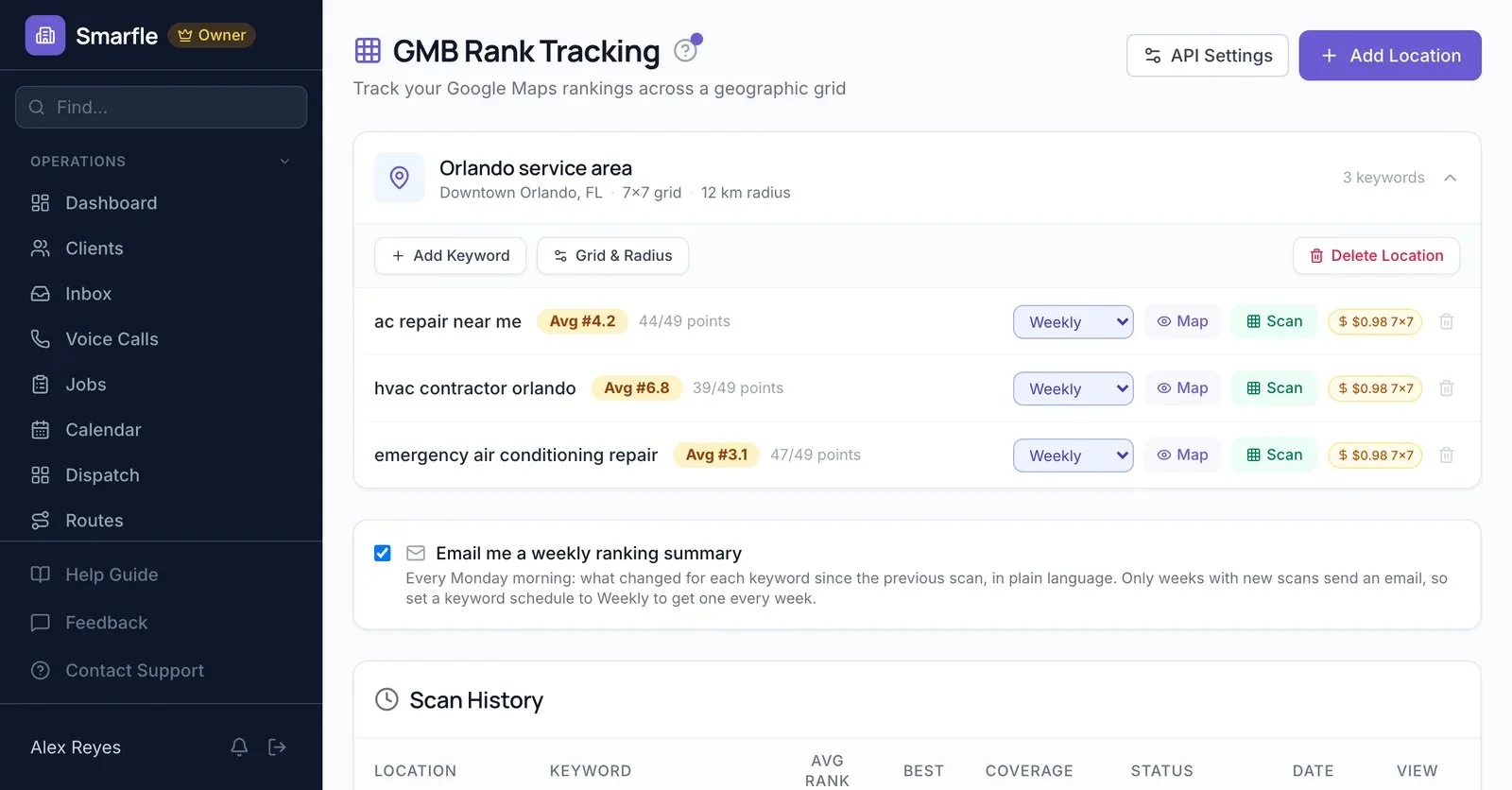
  • ✓Weekly Google Maps rank scans
Price$700/mo per profile · month-to-month
Your agency isn't delivering? Talk to us.STEP 1 OF 2
No contract. Cloudflare Turnstile blocks spam.
Basics

What a Google Business Profile is and why it matters

A Google Business Profile, or GBP, is the free listing that shows your business on Google Search and Maps. It holds your hours, phone, photos, reviews and posts. For many potential customers, it is the first thing they see.

Is a profile enough on its own?A profile can win map calls by itself. Your website gives Google more to match and gives buyers a reason to call you first.Local SEO
  1. 01

    It costs nothing to claim

    Google charges nothing to add or claim a Business Profile. You need a Google account and a business that meets Google's guidelines. Verification comes next.

  2. 02

    Verification earns trust

    Google says verification tells it you can represent the business. Verified profiles are more likely to show in local search results. It is the first step of local SEO.

  3. 03

    Your profile and your website work together

    The listing wins the click in local search. Your website answers the follow-up questions and closes the call. Optimizing the GBP and the site together works best, as one local SEO plan.

  4. 04

    Free does not mean finished

    Claiming takes minutes. Keeping hours, photos, posts and replies current takes a little time every week, and that steady work is what we manage.

  5. 05

    Owners and managers

    A profile can have several owners but only one primary owner. Managers can edit nearly everything, but they can't add or remove users or delete the profile.

  6. 06

    Chat and call history are gone

    Google retired chat and call history on every Google Business Profile on July 31, 2024. Calls from the profile still appear in the performance report.

How it works

How Google ranks business profiles

Google says local results depend mainly on relevance, distance and popularity. You can't pay Google for a better local ranking, so the profile itself has to earn it.

Local search is not one listEach person sees results based on where they are. That is why we scan a 7x7 grid instead of checking one spot.How the local pack works
  1. 01

    Relevance

    How well your profile matches the search. Your primary category, services and description tell Google what you do. Google says complete, accurate business information makes a profile more likely to appear in local results.

  2. 02

    Distance

    How far you are from the person searching. Distance sits mostly outside your control. If a searcher shares no location, Google uses what it knows. You can't move your office, but service areas and city pages help Google connect you to nearby searches.

  3. 03

    Popularity

    How well-known your business is. Google points to reviews, ratings, links and mentions across the web. A steady flow of fresh reviews, each with a reply, helps most.

Why it pays

What an optimized Google Business Profile does for a local business

Optimizing a GBP is free apart from the time it takes. Here is what that time buys in local search.

01

More visibility in local search

A complete, active profile gives Google more reasons to rank you for nearby searches. That visibility reaches buyers in your market first.

02

First look before your site

For many searches, buyers meet your profile before your site. Photos, posts and replies give them a reason to call.

03

Every review counts

Google links reviews and ratings to local ranking. Each new review and reply also gives buyers fresh proof online.

04

Leads you can measure

Your performance report counts calls, site clicks and requests for directions. You see what an optimized listing earns each month.

What's included

What our GBP management covers

Six jobs we do to optimize each listing, every month.

Category and services

The primary category and the few extras that match your best searches, plus every service you sell.

Profile posts

Offers, updates and project posts written in your voice and scheduled ahead.

Photos

Real photos of your team, work and location, added regularly and named clearly.

Reviews from every job

A request after each job and reply drafts you approve before they post.

Hours and business information

Opening times, holiday schedules, attributes and service areas, kept accurate as your business changes.

Rank grid scans

A weekly grid shows where you rank across your local service area for each keyword.

Guide

Google Business Profile optimization in ten steps

This guide follows Google's own tips and guidelines for local businesses. Most owners can finish the first steps in an afternoon. The last two never stop.

How we optimize your listingWe follow this guide in the first two weeks, then keep posts, photos and reviews current every week.What a Business Profile is
  1. 01

    1. Claim and verify the listing

    Find your business on Google Maps, claim the listing and pick a verification option. Posts from an unverified profile stay pending and don't show.

  2. 02

    2. Use your real business name

    Your name should match the name on your sign. Leave out service, product and location words. Google says extra words could lead to a suspension.

  3. 03

    3. Choose the right primary category

    Pick the specific category that describes your core business. Google asks you to use as few categories as possible, so add extras only when they fit.

  4. 04

    4. Fill in hours and business information

    Add regular and special hours for holidays, a local phone number and your website. Complete information helps Google match you to more searches. Google reviews your edits before they go live.

  5. 05

    5. Write a specific description

    Say what you do, where you work and who you serve. Google allows a description of up to 750 characters. Write for people, not for keyword lists.

  6. 06

    6. Add services and products

    List every service you sell in the services section, with a short note on each. The products section suits retail and some trades. Availability depends on your business type.

  7. 07

    7. Show real photos and videos

    Add photos of your team, your work and your location. Google says photos and videos let you show potential customers what you offer.

  8. 08

    8. Post updates and ask for reviews

    Updates, offers and events appear in the Updates or Overview tab on mobile, and in the From the owner section on desktop. Request a review from each customer, then answer every one. Google checks each post against its content policy.

  9. 09

    9. Set service areas, not a radius

    Service-area businesses hide their address and list up to 20 areas. Google asks you to stay within about a two-hour drive from your base.

  10. 10

    10. Keep it current every week

    Update special hours before holidays, swap in new photos and answer new reviews within days. A stale profile makes buyers wonder if you're still open.

Avoid these

GBP mistakes that cost calls or suspensions

Each one breaks a Google guideline or wastes a profile's local potential. We look for all six in the week one audit.

Keywords in the business name

Adding a city or a service to your name breaks the guidelines. Google says extra words could lead to a suspension.

A virtual office address

Google treats virtual offices as ineligible for a profile. P.O. boxes and remote mailboxes don't qualify either.

Showing a home address

If customers never come to you, Google's rules call for a hidden address and a list of the areas you serve.

A call center number

Google asks for a local number under your direct control, not a central call center line, whenever possible.

Asking only happy customers

Google's policy bans asking only for positive reviews. It also bans discounts or gifts in exchange for any review.

Too many categories

Extra categories that don't describe your core business blur relevance. Google asks for as few as possible.

Our rule

Complete and current beats clever. Every single week.

Fake reviews and keyword-stuffed names risk a suspension. Accurate details, real photos and steady replies are the safe path to more calls.

Our platform

Google Business Profile management run on Smarfle

Rathly runs Smarfle, the platform behind your profile work. It schedules posts, sends review requests and scans Google Maps, all connected to your own Google account. smarfle.com ↗

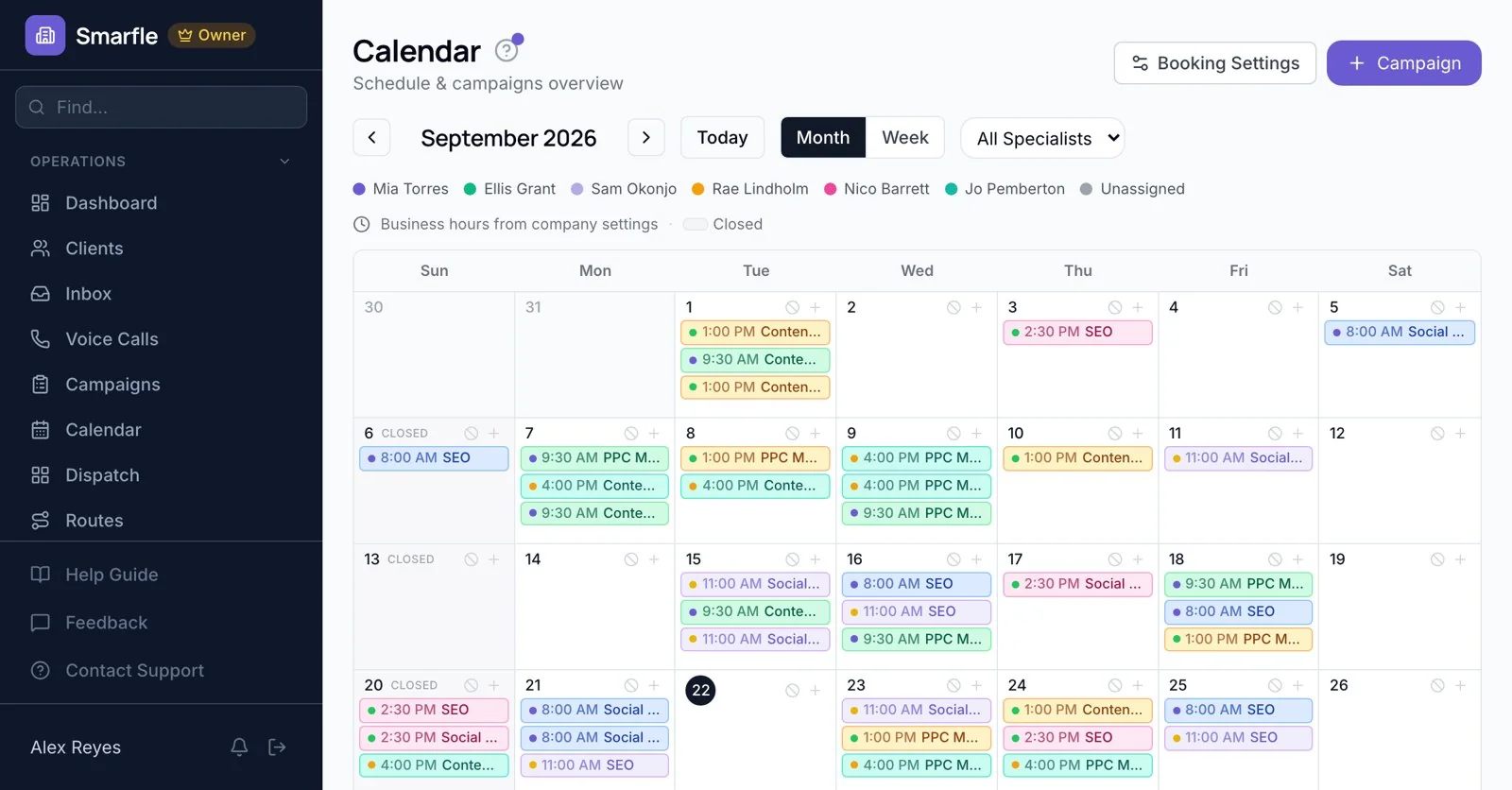
Smarfle calendar with scheduled SEO, PPC, social and content tasks for September 2026
Smarfle · calendar with posts and tasks for the month

Post scheduling

Profile posts planned on a calendar weeks in advance.

Review flow

Every customer gets your Google review link after each job.

Grid scans

Weekly rank checks across a 7x7 grid for every keyword.

Your account

We hold manager access only, and ownership never leaves you.
Tracking

What GBP performance data shows each month

The performance report in your profile lists only the metrics that apply to your business. These six matter most for local SEO and leads.

01

Calls

Taps on the call button in your local listing. The listing needs a phone number before Google can count them.

02

Website clicks

Taps on your website link. Tag that link, and Analytics shows what those visitors do on your site next.

03

Direction requests

Requests for driving directions to your location. Google filters out repeated taps, cancellations and spam.

04

Searches

The search terms that helped people in your market find your profile. Google updates this list at the start of each month.

05

Profile views

People who saw your profile on Search and Maps. Google counts each person only once a day.

06

Bookings

Appointments made through a connected booking provider. This metric shows up only once a provider runs your bookings.

Process

Your first month of profile management

We fix the profile first, then keep it active in local search every week.

  1. 01Week 1

    Access and audit

    You add us as a manager. We review categories, services, photos and reviews.You get a profile fix list
  2. 02Week 1

    First scan

    We run a grid scan for your main keywords to set a ranking baseline.You get a baseline rank grid
  3. 03Week 2

    Fix the profile

    We correct categories, services, the description and attributes, and add photos.You get a complete profile
  4. 04Weeks 3 to 4

    Posts and reviews

    Posts go on the calendar, and review requests keep fresh reviews coming.You get steady weekly activity
  5. 05Every month

    Report

    Google Maps rank, calls, direction requests and reviews compared with the last month.You get a monthly profile report
  6. 06Today

    Share your profile

    Send your profile link, the searches you want to win and any questions.Talk to us →
Pricing

Google Business Profile management pricing

One price for each profile. Add profiles as you add locations.

Profile management

$700/mo per profile

Best for local storefronts and service-area businesses that want more calls and directions from Google Maps.

  • ✓Category and service setup
  • ✓Weekly posts and photos
  • ✓Review requests and replies
  • ✓Weekly Google Maps rank scans
  • ✓Monthly profile report
Get a quote →
What changes the price
  1. 01Number of locations and profiles
  2. 02Posts and photos each month
  3. 03Review volume to request and reply to
  4. 04Keywords tracked in the grid
Get a fixed quote →
Full local SEO, with pages, listings and links, starts at $2,000/mo.
★★★★★
“Really good experience with Rathly Marketing. They helped fix several SEO issues on our website and improved our visibility in New York search results. We started seeing better rankings and more calls within the first few months. ...”
MNMẫn N.
New York · Google review · Sep 2026
★★★★★
“Ordered a website SEO audit and received clear recommendations in an easy-to-understand format. Their developer is already implementing the technical SEO suggestions. They work fast!”
PMPavlo M.
Orlando · Google review · Mar 2025
★★★★★
“Ihor is a highly skilled individual when it comes to website development. He built a new website for us. Delievered on time. And was very responsive. I recommend him for your project.”
DDrparkernyc
Orlando · Google review · Nov 2025
Offices

Meet us in Orlando or New York

Visit by appointment, or work with the same team by phone and video from anywhere in the US.

FL

Orlando office

Since Feb 2025
Rathly · 111 N Orange Ave, Orlando, FL 32801
Downtown Orlando, a short walk from Lake Eola Park. Visits by appointment.Hours Mon to Fri, 10 AM to 5 PM. Closed on US federal holidays.(321) 732-8258Serving Orlando, Winter Park, Kissimmee, Lake Nona, Sanford and Central FloridaSEO in Orlando · Web design in Orlando · PPC in Orlando
Orlando office page →
NY

New York office

Since Sep 2026
Rathly · 1177 6th Ave, New York, NY 10036
Midtown Manhattan, two blocks from Times Square. Visits by appointment.Hours Mon to Fri, 10 AM to 5 PM. Closed on US federal holidays.(347) 918-2146Serving Manhattan, Brooklyn, Queens, Long Island and the tri-state areaSEO in New York · Web design in New York · PPC in New York
New York office page →
Map of the Rathly Orlando office at 111 N Orange Ave
Google Business Profile · FLRathly · Orlando111 N Orange Ave, Orlando, FL 32801★ 5.0 · 10 reviews · Open in Google Maps ↗
Map data © Google
Real answers

Questions about Google profiles

Ranking

When will we rank higher on Google Maps?

Profile fixes and steady reviews often move Maps rank within weeks. Competitive cities and new profiles take longer. Forterra Pest Control led the Aubrey, Texas map results on three searches within a month.
Access

Will you own my Google Business Profile?

No. You stay the primary owner, and we join as a manager. You can remove our access at any time from the profile settings, and every post, photo and review stays on your profile.
Reviews

Can you remove bad reviews from my profile?

Only Google can remove a review, and only when it breaks Google's policies. We help you report those and write calm public replies to the rest. Real complaints answered well often build trust.Read the full answer →
Fake

Is buying Google reviews allowed?

No. Google's policies ban fake reviews, and the FTC's 2024 rule bans buying or selling fake reviews. We only ask real customers for honest reviews after real jobs.
How-to

How do I rank my Google Business Profile?

Verify it, fill in every field and pick the right primary category. Add real photos, post updates and earn reviews every month, then reply to each one.Read the full answer →
Cost

Is a Google Business Profile free?

Yes. Google charges nothing to create or claim a profile. You pay only for help managing it, and our management costs $700 a month per profile.

Get your profile managed

  • ✓ The profile always stays yours
  • ✓ Weekly posts, photos and scans
  • ✓ Month-to-month, cancel any day
  • ✓ A reply the same or next day
Get a quoteSTEP 1 OF 2
What isn't working?
No contract. Cloudflare Turnstile blocks spam.
Call usTalk to us →