


Most happy customers never leave an online review on their own. They mean to, then the day moves on. The businesses with hundreds of recent Google reviews aren't luckier. They ask every customer, the same way, at the same moment, and their online reputation grows a little every week.
This guide covers that routine, from getting your Google review link to catching up with past customers and doing the rating math. The exact words to use in texts, emails and in person are in our companion guide on how to ask customers for Google reviews.
Why recent reviews matter more than old ones
BrightLocal surveyed 1,002 US consumers for its Local Consumer Review Survey 2026. The findings explain why a review routine pays off.
| Finding | Consumers |
|---|---|
| Read reviews for local businesses | 97% |
| Look for reviews written in the past three months | 74% |
| Look for reviews written in the past two weeks | 32% |
| Won't use a business with fewer than 20 reviews | 47% |
| Only consider businesses with 4 stars or more | 68% |
| Expect the owner to respond to reviews | 89% |
Old reviews still count toward your rating, but buyers notice dates. A profile with 200 reviews and nothing new since last spring looks like a business that slowed down. Reviews are public feedback, and fresh positive reviews build trust faster than an old total. Online reviews also feed your local rankings, as our reviews and local SEO answer explains.
Get your Google review link and QR code
The fastest way to get customers to leave a review is a direct link. It opens the review box with your business already selected, so customers skip the search step, which is where most of them give up.
- Sign in to the Google account that manages your Google Business Profile.
- Open your profile, then select Read reviews and choose Get more reviews.
- Copy the link, or right-click the QR code to save it as an image.
- Save both where your team can find them, such as your phone and invoice templates.
In Google Search, the Ask for reviews button on your profile opens the same window.
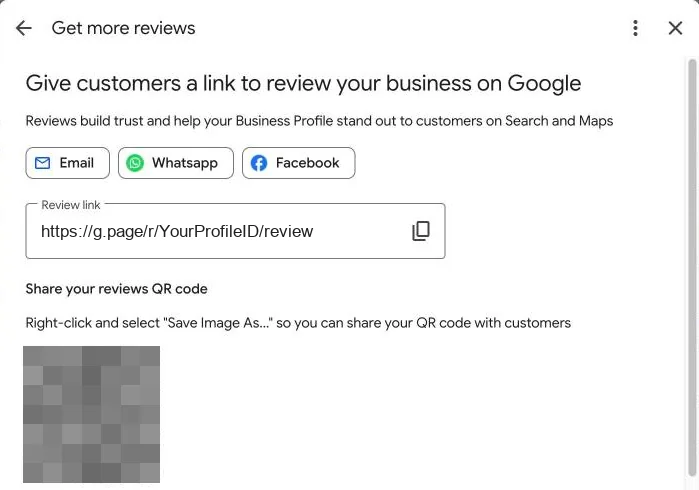
Google generates the QR code only in a computer browser, not on a phone. Print it on receipts, leave-behind cards and truck decals. Our guide to the Google review QR code shows where it works best and how to count scans.
Put the link where customers already look
Asking in person, covered next, brings the most reviews. A link in the right places catches the customers who meant to leave one and forgot.
- Invoices and receipts, with one line under the total
- Your email signature, for the office and every tech
- The thank-you page on your website, after a booking or payment
- Your social media profiles, in the bio or a pinned post
- Leave-behind cards, with the QR code printed on them
Keep the wording plain, such as "Tell others how we did on Google." Ask for honest feedback, never for five stars. A social media post every few months reminds past customers too, and the companion guide above has ready-made review request texts.
Ask at the moment the customer is happiest
Timing decides most of your results. Make the request right after the customer sees the result of your work, while the feeling is fresh.
| Business | The best moment to ask |
|---|---|
| Home services, such as HVAC, cleaning or pest control | When the tech finishes and the customer checks the work |
| Dental and medical practices | At checkout, with the link sent by text that afternoon |
| Law firms | When a matter closes with a good outcome for the client |
| Roofing and remodeling | At the final walkthrough, before the last invoice |
Start in person, then text the link within the hour. Don't have anyone write the review on the spot or hand them a tablet. Google's policy bars pressuring customers to review while they're at your business.
Run the same routine every week
Reviews grow when asking becomes a habit, not a campaign. This is the weekly routine we set up for clients.
- Ask in personThe tech or front desk asks before the customer leaves.
- Text the linkThe link goes out the same day, with the customer's first name.
- Remind onceOne short reminder goes out three days later, then no more.
- Reply to allSomeone replies to every new review within two days.
- Count weeklyTrack new reviews per week next to jobs completed.
Track reviews per job, not just the total. If you finish 40 jobs a week and get three reviews, the requests aren't going out. A text sent automatically after each job closes this gap, and our help with your Business Profile includes setting it up.
Catch up with existing customers once
A new routine only reaches future customers. To catch up, make one review request to everyone you served in the last three to six months. Email suits a batch like this, and text works for customers who agreed to hear from you that way.
Include the whole list, not only the customers you expect to be happy, because Google's policy bars selectively asking for positive reviews. Do it once, too, since a second wave to the same people feels like pressure. After that, the weekly routine keeps new reviews coming.
How many reviews it takes to raise your rating
The math is simple, and it helps you set a target to improve your rating. Google says your score is the average of all published ratings, shown to one decimal place. It can take up to two weeks to update after a new review.
Say your profile has 50 reviews with a 4.2 average. To reach 4.5, you need 30 new five-star reviews in a row. The 50 old reviews add up to 210 stars, and 210 plus 150 new stars makes 360 stars across 80 reviews, which is 4.5.
The more reviews you already have, the slower each new one moves the average. That's why a routine works better than chasing a number.
A single one-star review costs more than it looks. The number of five-star reviews it takes to win back your average depends only on that average, not on how many reviews you have.
| Your average | Five-star reviews to offset one 1-star |
|---|---|
| 4.0 | 3 |
| 4.2 | 4 |
| 4.5 | 7 |
| 4.7 | 13 |
| 4.8 | 19 |
| 4.9 | 39 |
The higher your rating, the more each negative review costs you. Fix the problem behind a complaint and reply to it in public. Our negative review replies show how.
What to avoid
Some shortcuts break Google's rules and can cost you the reviews you already have.
- No rewards. Google prohibits discounts, gifts or free services in exchange for reviews.
- No filtering. Invite every customer, not only those you expect to be happy.
- No quotas. Google's policy bars requiring staff to collect a set number of reviews.
- No on-the-spot reviews. Let customers review later, from their own phone.
- No bought reviews. Paid reviews break both Google's rules and US law.
The FTC rule and its penalties are in is it legal to buy Google reviews? Google treats offers like a discount for a review as fake engagement, and it can remove those reviews.
Common questions about getting reviews
How many Google reviews does a business need?
There's no fixed number, but 47% of consumers in BrightLocal's 2026 survey won't use a business with fewer than 20 reviews. Aim to pass 20 first, then keep new ones coming every month.
How many five-star reviews cancel out a one-star review?
It depends on your average. At 4.5 stars, it takes 7 five-star reviews to get back to 4.5. At 4.8, it takes 19. Divide your average minus 1 by 5 minus your average, and round up.
Why doesn't a new review show up right away?
Google checks every review against its policies before it appears on your Business Profile, which Google says can take a few days. If a customer says they left a review and you can't see it yet, wait a few days before you ask again. Reviews that Google removes for a policy break won't come back. Our guide on why Google reviews disappear covers the common causes and what you can do about each.
Do customers need a Google account to leave a review?
Yes. Google says reviewers need to sign in to a Google account. They can create one with any email address, not only Gmail.
Should I reply to every review?
Yes. Reply to positive reviews with a personal note and to negative feedback with facts and an offer to help. Our guide on how to respond to Google reviews has examples. The Map Pack answer explains how ratings show up next to your listing.