


Your replies sit under every review, in public, for years. Future customers read them to judge how you treat people when something goes right and when it goes wrong. A good review response takes two minutes. A defensive one can cost you more than the review itself.
Why responding to reviews matters
People expect an answer. In BrightLocal's 2026 survey, 89% of consumers said they expect business owners to respond to reviews. 80% said they're more likely to use a business that replies to all of its reviews, and 81% expect a reply within a week.
Google agrees from its side. Its help pages say a prompt response shows you value customer feedback, and that good answers make a business stand out. Its local ranking page adds that a higher review count and better ratings can lift your position. So every response does two jobs, one for the next reader and one for your online reputation.
How to reply in your Business Profile
You can respond once Google has verified your profile. Use the Google account that owns or manages it.
- Open your Business Profile from Google Search, Maps or business.google.com.
- Select Read reviews to see every review in one list.
- Select Reply next to the review you want to answer.
- Write your response, read it once more, then select Reply to send it.
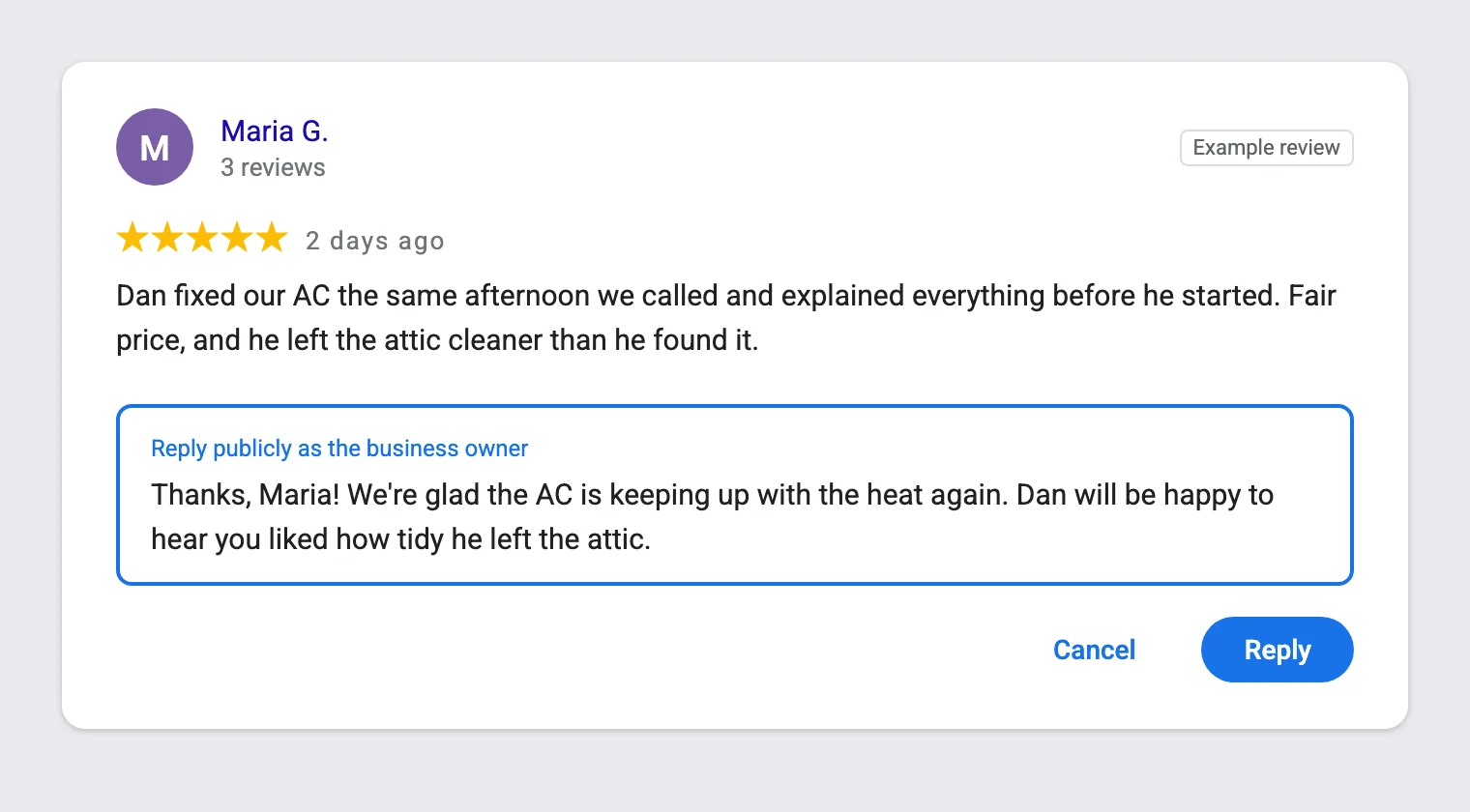
On a computer, you can also respond from Google Maps. Search for your business name, scroll to Reviews and select Reply under the review.
Google notifies the reviewer when you respond. It also checks each response against its content policy, which usually takes up to 10 minutes and can take up to 30 days. It appears under your business name. You can edit or delete it later from the same screen, and the reviewer can still change their review after reading yours.
Google's own rules for a good review response
Google's help page on reviews gives owners a short list of do's and don'ts. Every example in this guide follows them.
- Keep it short and polite. Customers value direct, honest responses, and long ones lose readers.
- Make it personal. Use the reviewer's name, answer their specific feedback and sign with your name.
- Skip promotions. Leave deals and offers out, and mention a detail that invites them back.
- Protect privacy. Never share private details, and move complex problems to a phone call or email.
- Own real mistakes. Apologize where you're at fault, but don't accept blame for things outside your control.
How to reply to a positive review
A short, personal response beats a long one. Google advises against sending everyone the same thank-you, and readers spot a copy-paste answer right away, which costs you trust.
Use a three-part formula. Thank them by first name and mention one detail from their review. Then add a line about the next visit or the people who served them, for example the tech's name. Keep the tone warm and plain, the way you'd talk at the door.
"Thanks, Maria! We're glad the AC is keeping up with the heat again. Dan will be happy to hear you liked how tidy he left the attic."
"Thank you, James. Getting your move-out clean done in one day was a tight schedule, and our crew enjoyed the challenge. We're here whenever you need us."
When a review names someone on your team, pass the praise on. "Thank you, Carla! I showed your review to Luis, and it made his week."
A star rating with no text needs only one line, such as "Thanks for the five stars, Ben. We love having you as a customer." Our set of positive review response examples covers more situations.
How to reply to a mixed review
Three- and four-star reviews are the hardest to answer, because the customer liked part of the job and not the rest. Acknowledge both halves. Thank them for the good, own the issue in one sentence, and say what you changed to improve.
"Thanks, Priya. We're glad the new water heater runs well, and you're right that our crew left a mess in the garage. That's not our standard. We've added a cleanup check to every install."
"Thank you, Greg. Glad the lawn looks sharp. You're right that we arrived after the window we gave you, and we should have texted. Our office now sends an update when a crew runs late."
Don't argue the stars. A calm answer to a mixed review often reads better to the next customer than a wall of five-star ratings.
How to reply to a negative review
Read the review twice, wait an hour if it stings, then respond. Your audience is the next customer, not the reviewer, so treat the complaint as a chance to show how you fix problems.
- Thank themThank the person for taking the time to share feedback.
- Own your partApologize for what went wrong, without blaming the customer.
- Give the factsAdd context in one or two calm sentences, with no private details.
- Move it offlineInvite them to call or email a named person to fix it.
"Thank you for telling us, Karen. We're sorry our tech arrived two hours late, and you deserved a call before that. We've changed how we schedule afternoon visits. Please call our office manager, Lisa, directly so we can make this right."
Three kinds of responses make things worse. Arguing over the facts pushes readers to the customer's side. Sharing order, health or billing information exposes private data. Publicly accusing a reviewer of lying can break the FTC's review rule when the claim is false and aimed at getting the review removed.
For ten worked examples of responding to complaints, from no-shows to refund demands, see how to respond to negative reviews. If a review breaks Google's rules, the Google review removal guide explains how to report it. Healthcare practices carry extra limits, because a response can reveal who is a patient. Our guide on how doctors can manage their online reputation covers safe wording.
How to keep up with replies
Respond within two business days. BrightLocal's numbers show most consumers expect a reply within a week, so two days puts you well ahead. Set a routine, such as checking reviews every morning, and give one person the job.
Many review tools now draft replies with AI. A draft saves time, but edit every one before it goes out, because readers can tell when nobody cared enough to write. Add the reviewer's name and one specific point from their review. Cut stock lines like "we value your feedback," and check that nothing private slipped in.
The same calm approach works on social media too, as our answer on handling negative comments and reviews shows. If you'd rather hand off reputation management, our Business Profile optimization service includes responses to every review.
Common questions about review replies
Should I reply to every Google review?
Respond to every review that has text, positive or negative. Google suggests making each answer count rather than pasting the same thanks, so keep star-only responses to one line.
Can I reply to old reviews?
Yes. A late response still helps the next reader, especially on a negative review that has sat unanswered.
Does responding to reviews help my ranking?
Google lists responding to reviews among its tips for local businesses and says helpful replies help a business stand out. It doesn't say how much a response moves rankings, but your review count and ratings do count toward prominence.
Can I edit or delete a review response?
Yes. Open Read reviews in your Business Profile, find your response, then select Edit or Delete. Google checks an edited response again before it appears.