


A one-star review from someone you never served stings, and it sits next to your name on Google Maps. Google does take many of these down when you report them the right way. It won't take one down because it hurts, though. Below is the process we follow for client profiles, built on Google's own rules.
Can you delete a Google review of your business?
No. Only the person who wrote a review can delete it. As the owner of the Google Business Profile, you can report it, and Google decides whether it violates its content policy.
Google states plainly that a bad rating alone isn't a reason. Its help page asks owners not to report a review "just because you disagree with it or dislike it." Google also stays out of disputes between a business and its customers.
So the question to ask isn't "Is this review unfair?" It's "Does this review violate a specific rule?" If it does, you have a real chance. If it doesn't, your public reply will do more for you than any removal request.
Which reviews Google removes
Google's policy for Maps contributions lists the content it takes down, from fake reviews to offensive language. These rules cover most of the negative reviews that local businesses report.
| Policy | What it looks like in a review |
|---|---|
| Fake engagement | A review from someone who never visited or hired you |
| Conflict of interest | A review from a competitor, a current or former employee, or a relative |
| Off-topic | A rant about politics, the news or anything outside a real visit |
| Harassment | Threats, or a post that singles out and targets one of your staff |
| Personal information | A customer's or worker's private details shared without consent |
| Profanity | Obscene language used to insult you or your team |
| Advertising | A review that promotes another business, a link or a phone number |
| Repetitive content | The same text posted again and again, from one or more accounts |
Two patterns deserve a closer look. A burst of one-star reviews in a single day, with no customer names you recognize, often points to fake engagement. A detailed complaint about how you treat staff, from an account with no other reviews, may come from a former employee. Note the dates, names and any proof before you report, because you may need it for an appeal.
How to report a review, step by step
Report each review from the Google account that owns or manages your Business Profile. That way the report shows up in Google's Reviews Management Tool.
- While signed in, search Google for your business name, or open Google Maps.
- Open your Business Profile, then select Read reviews to see every review.
- Find the review, then select the report icon next to it.
- Pick the reason that matches the policy the review breaks.
- Submit the report, and write down the date and the reason you chose.
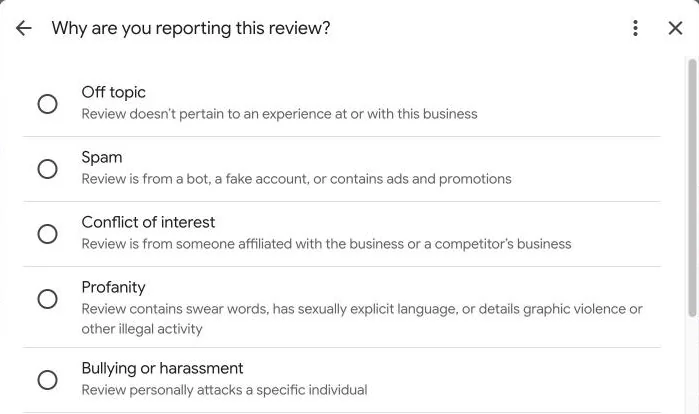
Google's form lists reasons such as Off topic, Spam, Conflict of interest, Profanity, Bullying or harassment, Discrimination or hate speech, and Personal information. The list can change, so read it each time. A fake review fits under Spam, which covers fake accounts, or under Conflict of interest. Pick with care, because the wrong reason can come back as "no policy violation."
Track the report and appeal once
Google's Reviews Management Tool shows every review you've reported for your profile. Open it from the Business Profile Help page on reviews that go against Google's policies, confirm your account and choose your business. You can also report new reviews there, which helps when the report icon is hard to find.
| Status | What it means | What to do next |
|---|---|---|
| Decision pending | Google hasn't finished its review yet | Wait, since Google says this usually takes several days |
| Report reviewed, no policy violation | Google found no broken rule | Appeal once, with clearer evidence |
| Escalated | Your appeal went to a second review | Watch your email for the final decision |
You get one appeal per review, and a single appeal can cover up to ten reviews. Use it well. Explain which policy the review breaks. Then point to your proof, such as no matching customer record or a reviewer who works for a competitor. If the appeal fails, the review stays.
When Google won't remove it
Some reviews break the law rather than Google's policy, and Google allows a separate route for them. A false statement of fact that harms your business may count as defamation, and Google accepts legal removal requests through a separate form. Flag the review in Maps first, then file the legal request with the exact review link. Talk to a lawyer before you go this route, since a court decides what counts as defamation.
Also know what you must never do. Since October 21, 2024, the FTC's rule on consumer reviews bans review suppression. A business can't use threats or intimidation to get a review changed or taken down. It also can't threaten groundless legal action, or make accusations about a reviewer it knows are false.
Be careful with services that promise guaranteed removal for a fee. Google removes reviews only for policy breaks, which you can report yourself at no cost. Some removal services rely on false legal claims, and those can put your own profile and reputation at risk.
How to delete a review you wrote
Some people searching this question wrote the review themselves and want it gone. Only the author can delete their own review, and it takes a minute on a computer.
- Open Google Maps and select the menu at the top left.
- Select Your contributions, then Reviews, to see every review you wrote.
- Select More next to the review you want to change.
- Choose Delete review, or Edit review to update it instead.
If you're an owner who solved a customer's problem, you can share these steps with them. Asking once is fine. Offering a refund or discount for the change isn't.
What to do with a review that stays
Most negative reviews stay up, and that's normal for a busy business with a real online reputation. Positive and negative reviews both tell readers something, and what they notice most is how you answer.
- Reply within two days. Thank the person, state the facts without blame, and offer to fix it offline. Our review reply guide has responses you can adapt.
- Ask for an update, once. If you solve the problem, you may ask the customer to update the review. Never offer a refund or a discount in exchange for a change.
- Get more recent reviews. A steady flow of new reviews pushes one bad review down the list and keeps your average fresh. Our guide on how to get more Google reviews covers a simple routine.
Our answer on how reviews impact local SEO explains how they affect where you show up. A fake one is worth fighting, and our guide to reporting fake Google reviews shows how to build the evidence.
Common questions about removing reviews
How long does Google take to decide?
Google says a report usually takes several days to evaluate. Appeals can take longer, and the result arrives by email.
How do I contact Google to get a review removed?
Start with the report option on the review itself. The Reviews Management Tool then shows the status and holds your one appeal, and Google sends the final decision by email.
Does a removed review still count toward my rating?
No. Once Google removes a review, your average and your review count no longer include it.
Is it worth paying someone to remove reviews?
Rarely. Reporting costs nothing, and Google's own support handles it, and paid help can't make Google remove a review that follows its policy. Walk away from any service that guarantees removal or wants payment before results. The same goes for claims of inside contacts at Google, or legal complaints filed for you without a lawyer. Want a team to watch and report reviews for you? Our Google Business Profile management includes it. The steps in our Business Profile optimization guide also help.