

Free dental website templates let a new practice start a site for little more than the cost of hosting. The safest source is the WordPress.org theme directory. Every template there costs nothing and passes a review before it goes live.
WordPress calls a website template a theme, so you will see both words below. We compared 10 dental and medical templates on October 14, 2026, using WordPress.org data and each theme's own files.
Free dental website templates compared
| Template | Built for | Active installs | Last updated | Theme type |
|---|---|---|---|---|
| Dentist Dental Care | Dentists and dental clinics | 50+ | Sep 19, 2026 | Classic |
| Dental Insight | Dentists and medical sites | 100+ | Sep 27, 2026 | Classic |
| Dentistry Clinic | Dental clinics and hospitals | 100+ | Aug 18, 2026 | Child of Dental Insight |
| Medazin | Medical, dental included | 200+ | Oct 3, 2026 | Classic |
| Medicore | Doctors and dental experts | 70+ | Jun 30, 2026 | Classic |
| Ultracare | Medical clinics, dental included | 70+ | Jun 27, 2026 | Block |
| ExS Medic | Medical, dental included | 200+ | Oct 10, 2022 | Child of ExS |
| SKT Doctor | Health care, dentists included | 200+ | Mar 4, 2026 | Classic |
| Hospital Health Care | Hospitals and clinics | 200+ | Dec 9, 2025 | Child of AwpBusinessPress |
| Medical Doctor | Doctors and dentists | 90+ | Oct 10, 2026 | Classic |
Install counts stay small for all ten dental website templates, so none of them leads the market. Upkeep matters more. Nine of the ten shipped a new version in the past year, and ExS Medic has had none since October 2022.
What a dental website template gives you
A template sets how the website looks, from colors and fonts to page layouts and menus. Every theme in the WordPress.org directory must use a GPL-compatible license, so you can use and change it at no cost.
Several authors describe their website templates as clean and responsive. Responsive means the layout adapts to phone screens, so test that claim on each live preview.
A template does not include the work that brings in patients. Pages that rank for treatments come from dental SEO, not from the theme. You still write each treatment page, add real photos of your team and office, and set up booking. An appointment section in a template usually needs form or booking tools to work.
You also need WordPress hosting and a domain, since these website templates run on a self-hosted WordPress site.
The 10 dental and medical templates
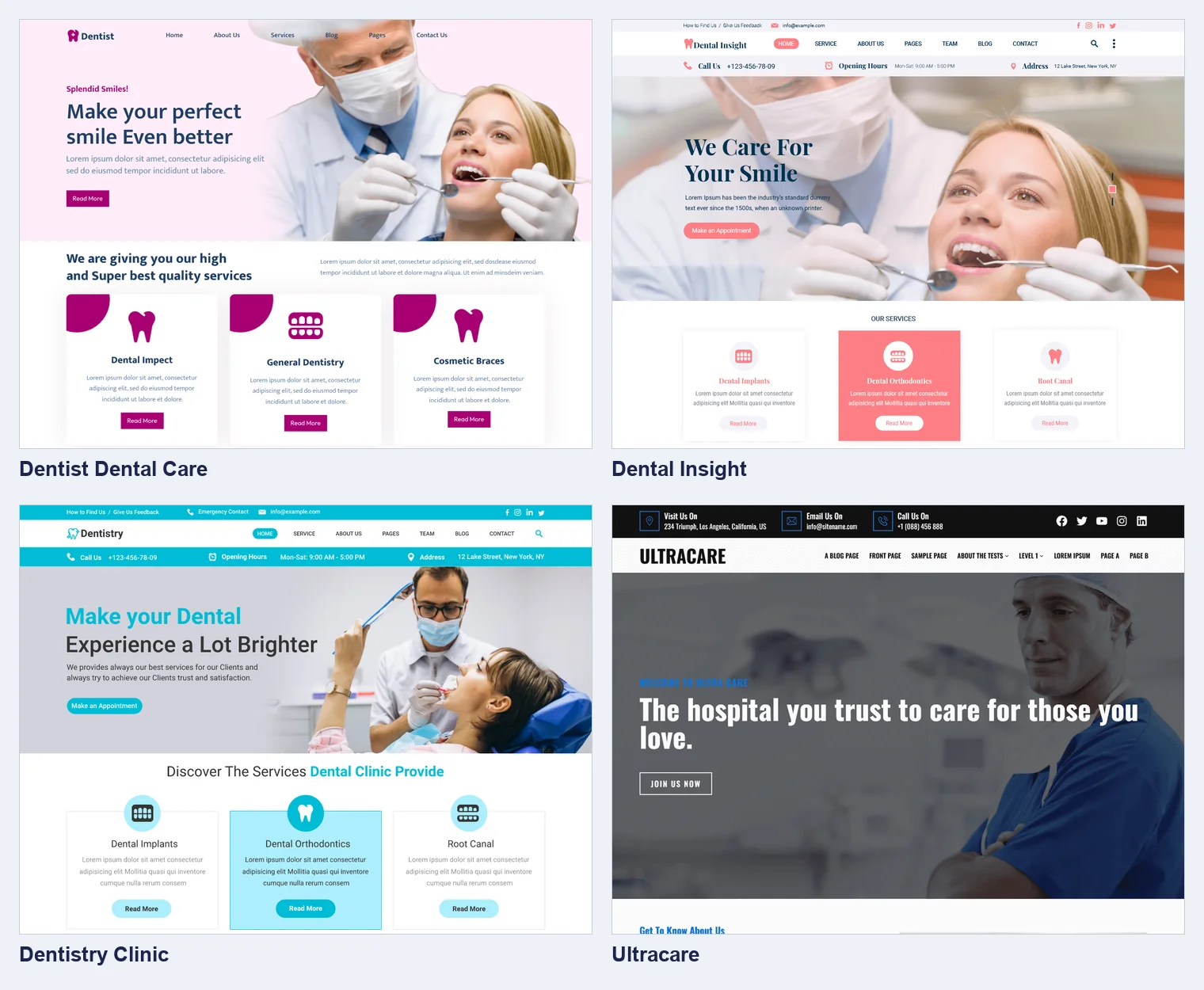
1. Dentist Dental Care
Misbah WP designed this template for a dentist, an orthodontist or a dental clinic. Its author describes a modern interface with features for services, the team, patient reviews and appointment requests. It is a classic theme that needs WordPress 5.0 and PHP 7.2. Version 5.8.5 came out on September 19, 2026.
2. Dental Insight
The author, pewilliams, designed it for dentistry first and lists medical sites too. Its features include support for Contact Form 7, Yoast SEO and WooCommerce, plus a patient review section. It is a classic theme for WordPress 5.0 and PHP 5.6. Version 8.5.5 came out on September 27, 2026.
3. Dentistry Clinic
A child theme of Dental Insight from the same author, so your site needs Dental Insight too. Its author calls it clean, modern and responsive, designed for a dental clinic, with online appointment scheduling. It runs on WordPress 5.0 and PHP 5.6. Version 5.8.3 came out on August 18, 2026.
4. Medazin
Nayra Themes designed this template for medical businesses, from a clinic or dentist to a pharmacy, with ready-made page sections. It carries the directory's e-commerce tag, so it suits a practice that sells whitening kits online. It needs WordPress 6.8 and PHP 7.4. Version 20.3 came out on October 3, 2026.
5. Medicore
Weblizar made this simple template for doctors, surgeons and dental experts. It has fewer layout options than the others, which keeps setup short, and its author calls the design clean and responsive. It needs PHP 7.4. Version 2.1.0 came out on June 30, 2026.
6. Ultracare
The only block theme on this list, designed by Star Themes. You edit headers, footers and every page template in the site editor, without code. Its author includes starter layouts for several medical fields, dentistry among them. It needs WordPress 6.8 and PHP 8.0. Version 1.0.6 came out on June 27, 2026.
7. ExS Medic
A child theme of ExS, so your site needs the parent theme too. Its author built it for speed and small file sizes, with WooCommerce support. The catch is age. Version 1.0.0 came out on October 10, 2022, and a template without updates can become a security risk.
8. SKT Doctor
Sonal S Sinha made this template for a hospital, clinic or health care center, and lists dentists among its uses. It is a classic theme that works with the block editor, WooCommerce and contact form tools. It runs on WordPress 5.3 and PHP 5.6. Version 2.1 came out on March 4, 2026.
9. Hospital Health Care
A WP Life made it for hospitals and clinics, with dental care among its uses. It is a child theme of AwpBusinessPress, so your site needs both. Its features include sections for services, the team and patient reviews. It needs PHP 5.4. Version 0.2.8 came out on December 9, 2025.
10. Medical Doctor
Themesglance designed it for a doctor, dentist or clinic. Listed features include a clean, responsive design with sliders, and appointment requests through Contact Form 7. It is a classic theme for WordPress 5.0 and PHP 7.2. Version 1.1.3 came out on October 10, 2026.
How to choose a dental website template
Compare five things before you install one of these website templates.
- Last update. Pick a template updated in the past six months, so it keeps pace with WordPress security releases.
- Requirements. Match the WordPress and PHP versions to your host. Ultracare, for example, needs PHP 8.0.
- Classic or block theme. With a block theme like Ultracare, you edit every part in one site editor.
- Responsive design. Open the live preview on your own phone and tap through the menus and forms.
- Speed. Run the demo through Google PageSpeed Insights and compare mobile scores for your top two picks.
Skip any template that hides the features you need behind a paid upgrade.
How to build a dental website from a template
- Install WordPress. Many hosts install it in one click from their control panel.
- Add the template. Under Appearance, open Themes, choose to add a new one and search its name.
- Build the main pages. Write a home page, a page per treatment, a team page and a contact page.
- Add appointment booking. Connect the online booking tools in your practice software, or add a form plugin.
- Fill in local details. Show your address, hours and phone on every page, and link your Google profile.
- Test before launch. Check each page on a phone, send every form and run PageSpeed Insights again.
Keep forms simple. Ask for a name, phone number and preferred appointment time, not health details. A form tool that stores patient health data must sign a business associate agreement with your practice.
When to move past a free template
A free template suits a new dental clinic at the start. It begins to hold the practice back as the site grows. Signs include dozens of treatment pages, booking tied to the schedule, or a need for faster pages than the template allows. If a free theme comes close, our WordPress development team can customize it before you start over.
At that point a custom design costs more up front but saves staff time and fits the practice. Our dental website design page shows what a custom Rathly build includes and what it costs.