
Local SEO keywords are searches from people who want a business near them. "Emergency dentist Orlando" and "plumber near me" are local keywords. So is a plain "dentist", because Google reads where the searcher is.
The right local keywords decide which customers find you. Below is the local keyword research process we use for service businesses, step by step.
What are local SEO keywords?
Local keywords come in three types. Each local keyword type tells Google something different about location.
| Type | Example | How Google reads it |
|---|---|---|
| City or area named | pest control Winter Park | The searcher names the place |
| Near me | emergency plumber near me | Google uses the searcher's location |
| No place named | dentist | Google still returns nearby businesses |
Google says local ranking depends mainly on relevance, distance and prominence. Keywords drive relevance. They tell Google which services and products you offer and in which location, so your business appears in relevant searches. You can't change distance, and prominence grows with links to your business, reviews and ratings. A good local SEO strategy works on all three.
1. Start with your services and service areas
Local keyword research starts with what you sell, not with a keyword research tool. Write down every service you want more of. Then write down each city, town and neighborhood you actually serve.
For example, a pest control company in Orlando might pick termite treatment, rodent control and mosquito control. Its areas might be Orlando, Winter Park, Kissimmee and Sanford. Each service and city pair, such as "termite treatment Winter Park", becomes a seed keyword. In pest control SEO, each service then gets its own page, with the city named in the title.
Leave out any location you can't serve well. A keyword for a town you never visit brings calls you have to turn away.
2. Add the words customers use
Owners describe services in trade terms, while people searching describe problems. For example, a dentist says "restorative dentistry", but a patient types "fix broken tooth near me". Every local keyword you choose should use their terms, not yours.
Pull customer wording from call notes, emails, reviews and the questions on your Google Business Profile. Then add the modifiers people attach to local search terms.
- Urgency. Emergency, same day, open now and 24 hour signal someone ready to call.
- Cost. Cost, price, financing and cheap signal someone comparing budgets.
- Trust. Best, top rated and reviews signal someone comparing local businesses.
- Audience. Phrases like "for restaurants" or "for seniors" narrow the search to a specific type of customer.
3. Check search volume with Google's tools
A keyword research tool estimates how many people search each keyword. Three free Google tools cover most local businesses.
- Keyword Planner. It gives monthly search volume and ad cost for each keyword. Google requires a Google Ads account with billing details.
- Search Console. Its Performance report lists the queries that already bring your site impressions and clicks.
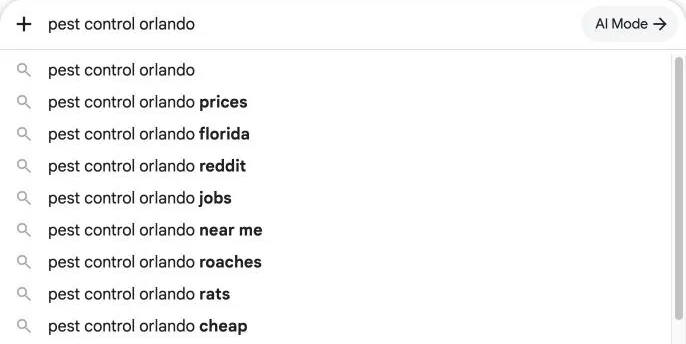
- Google Search. Autocomplete and the related searches at the bottom of the results reveal real wording.
When using Keyword Planner, set the location to your service area, so the numbers reflect local demand.
Local search volume is often small. A phrase searched a few dozen times a month in one city can still bring paying customers. People who add a city to a service search are often ready to hire. Judge each local keyword by its potential to bring leads, not by traffic alone.
4. Check search intent on Google
Search each keyword yourself and study the local search results. The page types on the first page tell you what searchers want, and the competitors there show the bar to beat.
| What the results contain | What it means | Page to build |
|---|---|---|
| A map pack of local businesses | Strong local intent | Service page plus a Google Business Profile |
| Service pages from local competitors | The searcher wants a provider | Service or location page |
| Guides and articles | The searcher wants to learn first | Blog post or guide |
| Directories such as Yelp | One page will struggle to rank | Directory listings plus a strong service page |
Match your page type to what already ranks. A sales page will rarely rank for a question, and a blog post will rarely rank where Google puts a map pack.
5. Group keywords into a keyword map
Keywords with the same intent belong on one page. "Emergency dentist Orlando", "same day dentist Orlando" and "urgent dentist Orlando" all want fast care, so one emergency page can target all three. Dental SEO uses this grouping for emergency, implant and cosmetic pages. A keyword with a different intent needs its own page. Target the keyword with the clearest buying intent first.
| Page | Primary keyword | Related keywords | Searcher wants |
|---|---|---|---|
| Emergency dentistry | emergency dentist Orlando | same day dentist Orlando, urgent dentist Orlando | Care today |
| Dental implants | dental implants Orlando | implant dentist Orlando | A provider to compare |
| Implant cost guide | dental implant cost Orlando | cost of dental implants Orlando | Prices and financing |
| Winter Park office | dentist Winter Park | emergency dentist Winter Park | A nearby office |
Keep the keyword map in a sheet with the page, primary keyword, related keywords and intent. It becomes the plan for every new page.
Be careful with city pages. Google's spam policies call pages targeted at specific regions or cities that funnel users to one page doorway abuse. Build a city page only when you serve that location and have specific information about it, such as local projects, staff or reviews.
6. Place keywords on pages and your profile
Put the primary local keyword in the title tag, the H1, the first paragraph and the URL. Use related terms in headings and body copy where they read naturally. Each page should target one primary keyword, so your own pages never compete with each other.
Link related pages with descriptive anchor text. Google uses that text to understand what the linked page is about, and it points potential customers to the right service.
On your Google Business Profile, keywords belong in categories, services and the business description, never the name. Google asks that the profile name match the name on your signs and stationery. It also says to choose the fewest categories that describe your core business.
7. Track rankings and refresh your keywords
Check the Search Console Performance report each month. Look for queries with many impressions and few clicks, which point to a weak title or a page that misses intent. Pages ranking between positions 5 and 20 are your nearest opportunities, so update those first. New queries you never planned for can also reveal services or areas worth a page.
Review your local keyword choices every quarter, since services, competitors and customer wording change. Keyword research is a one-time add-on on our SEO services page, at $1,800. Our local SEO team then builds the pages and Google Business Profile around it.