
A suspension usually arrives by email with little explanation. The calls from Maps stop, and the profile you built over years seems gone. Most suspended profiles can come back, but only if your request shows Google you fixed the problem.
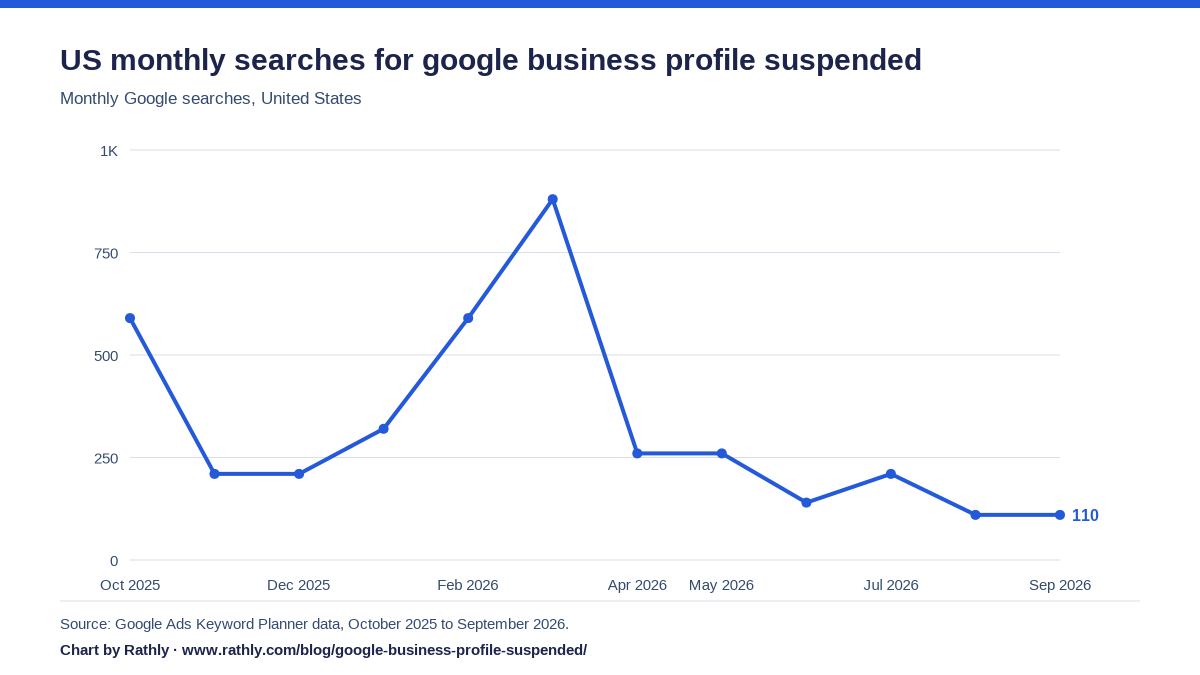
Owners hit this in waves. In Keyword Planner, US searches for "google business profile suspended" reached 880 in March 2026, about four times December's level. This guide covers why Google flags profiles, how to request reinstatement and what evidence works. Locksmith SEO sees more suspensions than most, since fake locksmith listings have long plagued Maps.
| Month | Searches |
|---|---|
| Oct 2025 | 590 |
| Nov 2025 | 210 |
| Dec 2025 | 210 |
| Jan 2026 | 320 |
| Feb 2026 | 590 |
| Mar 2026 | 880 |
| Apr 2026 | 260 |
| May 2026 | 260 |
| Jun 2026 | 140 |
| Jul 2026 | 210 |
| Aug 2026 | 110 |
| Sep 2026 | 110 |
What a suspension means
Google suspends or disables a Google Business Profile when it decides the listing breaks its guidelines. Its help page uses both words but doesn't spell out a difference between them. It says the public can't see a removed profile, and its owners and managers can't work on it.
Some owners find the listing still shows on Maps while they've lost the right to edit it. Search your business name in a private browser window to see which case you have. The fix for a suspension is the same either way.
Sometimes the restriction sits on your Google account instead. Then every profile you manage goes down at once, and you can't create or claim new ones. Appeal the account first from your My accounts page, where you can also track it. Once Google lifts it, appeal each profile on its own.
Common reasons Google suspends a profile
Google's notice rarely names the exact rule. These are the guideline violations we see most often, and each one needs fixing before you ask for a review.
| What triggers it | What Google's guidelines say | Fix before you appeal |
|---|---|---|
| Keywords or cities in the name | The name must match the real-world name, with nothing added | Change it to match your sign and paperwork |
| A virtual office or mailbox | A mailing address you don't work from isn't eligible | Use your real base, or switch to a service area |
| A shown address customers never visit | Service-area businesses must remove that address | Hide the address and list your service areas |
| A second profile for the same place | One profile per business or location | Remove the duplicate you don't need |
| A shared desk with no signage | Co-working spaces need signage and staff during hours | Move to a qualifying office or a service area |
| A name or phone shared with another business | Businesses at one address need their own names and profiles | Give each business its own name and phone line |
| Hours nobody answers | Hours must be the regular hours customers can use | Set the hours your staff actually take calls |
Big changes made all at once can also prompt a suspension review. Edit the name, address and categories one at a time, and only to match reality.
Suspended for suspicious activity or no reason
Some notices name no rule at all, or only say "suspicious activity". Google doesn't publish what that phrase covers. Look at what changed in the weeks before the suspension. Check for a new manager, a name or category edit, or a burst of edits in one day. Undo anything that doesn't match the real business information, then file your request.
When the problem is your reviews
Fake reviews bring a different penalty. Google may remove suspicious reviews and stop people from posting new ones for a while. It can also show a banner on your listing saying it removed reviews. Stop any program that pays for reviews or asks staff to post them before you ask Google to look again.
How to appeal a suspension
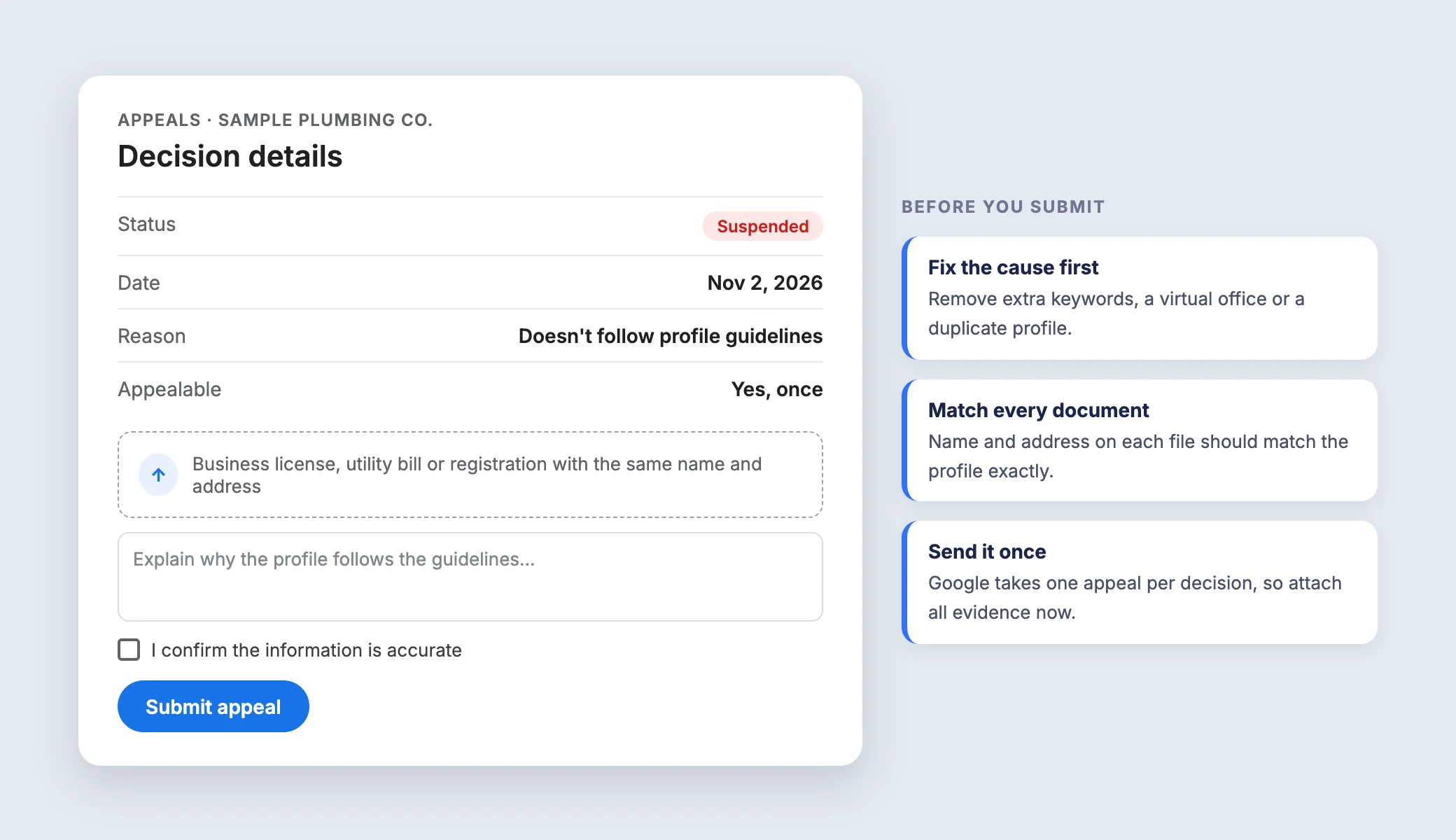
Google takes one appeal per decision, so prepare everything before you start. The appeals tool sits at support.google.com/business/?p=manage_appeals.
- Open the appeals toolSign in with the Google account that manages the profile, then select Confirm or Switch account.
- Pick the profileSelect the suspended profile, then Continue, and choose the decision you want reviewed.
- Check the reasonNote the date, the policy named and whether Google lets you appeal it.
- Add evidenceUpload documents that show the business name and address, plus a short explanation.
- Submit onceTick the readiness box and select Submit appeal. Google emails the decision.
If the tool doesn't list your profile, you're probably signed in with the wrong account. Try each account that ever managed it. If none works, Google's help team takes questions at support.google.com/business/gethelp. Describe the issues you see and attach screenshots.
Evidence Google accepts
Google gives four examples of documents. The name and address on each must match the profile exactly.
- Business registration from your state or county.
- A business license in the business name.
- A tax certificate issued to the business.
- A utility bill, such as electricity, phone, water or internet.
Cover any account or ID numbers you don't need to show. Google's list doesn't include photos, so treat a storefront picture as extra support in your explanation, never a replacement for these documents.
While you wait for a decision
Google doesn't publish a time frame for reinstatement. Check the status in the appeals tool, which shows where the request stands, such as Submitted, Approved or Not approved. While you wait, Google Ads management can keep calls coming through search ads.
Leave the profile alone during the review. Fresh edits, a second request or a new profile can all muddy the case. Keep answering calls and booking jobs through your website and other listings in the meantime.
If Google denies the appeal
Google may run an additional review if you have evidence the first request didn't include. Use the local appeals contact form in the help center and add only what's new. Businesses in the European Economic Area may have extra options for redress.
Don't create a new profile for the same business. Google tells owners not to, and a second profile can make the problem worse.
If 10 or more profiles went down together, answer Yes when the tool asks about a bulk appeal. Attach a spreadsheet with each Business Profile ID and documents that match each name and address. Only the profile you picked in the tool gets status updates and the email.
How to avoid the next suspension
Prevention costs less than an appeal. Keep the profile accurate and boring.
- Match the name to your sign and change it only when the real name changes.
- List only real places, with a storefront address only where customers visit.
- Limit who can edit, since a stray edit by a former employee can trigger a review.
- Check the profile monthly for suggested edits Google applied without asking.
When a suspension is costing you calls, our Google Business Profile service handles the fixes and the appeal.
Common questions about suspended profiles
How long does it take to reinstate a suspended Business Profile?
Google doesn't publish a time frame. It emails the decision once the review ends, and the appeals tool shows the status until then. Once reinstated, the profile returns with its owners and managers.
Can I appeal a Business Profile suspension more than once?
Each decision takes one appeal. After a denial, you can ask for an additional review with new evidence.
Is a disabled profile the same as a suspended one?
Google uses both words for profiles that broke its guidelines and doesn't explain a difference. The appeals tool and the evidence are the same for both.
Should I create a new Business Profile after a suspension?
No. Google asks owners not to create a new profile for the same business, so appeal the original instead.