
Sooner or later someone else needs into your Business Profile, formerly Google My Business. It might be an office manager answering reviews, a new partner, or an agency fixing your listing. Google lets you add users without handing over your login, and the role you pick decides how much they can change.
Pick the wrong role and you can lose control of the profile. This guide explains each role, the steps on a computer and a phone, and how to give an agency access to manage it safely.
Owner, manager or primary owner
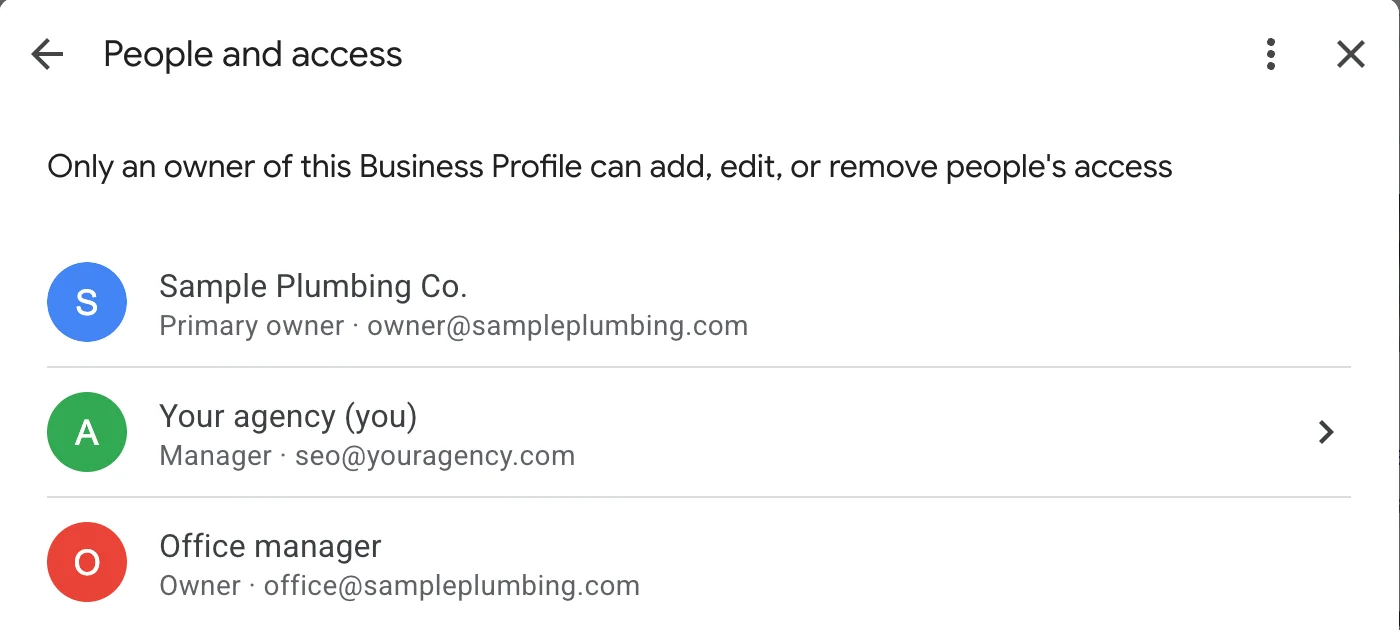
A profile can have several owners and managers, but only one primary owner. Each person signs in with their own Google Account, so nobody shares a password. This is the screen where you see them.
| What they can do | Owner | Manager |
|---|---|---|
| Add or remove users | Yes | No |
| Delete the whole profile | Yes | No |
| Transfer primary ownership | Primary owner only | No |
| Edit hours, phone, address and other information | Yes | Yes |
| Reply to reviews and questions | Yes | Yes |
| Post updates, photos and products | Yes | Yes |
| Link Google Ads and download performance data | Yes | Yes |
Google once called managers site managers. Today they have nearly the same access level as owners. The difference that matters is control over people. Only owners can add or remove users, and only one person can hand over the top role. Either role can link the profile to Google Ads, which lets Google Ads management show your address and distance in search ads.
How to add a manager, step by step
You need to be an owner to add users. If the Add button is missing, your own access level is manager.
- Open the settingsOn business.google.com or your profile in Search, select More, then Business Profile settings.
- Open People and accessThis list shows everyone with access and every invitation still pending.
- Add a userSelect Add at the top left and enter the email of the person or agency.
- Choose the access levelPick Manager for staff and agencies, or Owner only for people you fully trust.
- Send the inviteSelect Invite. Google emails you when the person accepts the invitation.
On a phone
Google retired the separate Google My Business app, so there's nothing extra to install. In Google Maps on your phone, the Business tab sits in the bottom right corner. You can also search your business name in the Google app. From your profile, open Business Profile settings, then People and access, and follow the same steps.
Google warns that some options differ between Maps, Search and your phone's system. If a menu doesn't match, open business.google.com in your phone's browser. The computer steps work there too.
What the person you invite does
The invitee gets an invitation email from Google and accepts it. They become a user right away, and you get an email saying so. If the invitation never arrives, check these four things.
- The spam folder. Ask them to search their inbox and spam for the Google email.
- The address. It must belong to a Google Account, since each user needs their own.
- Groups. Google won't accept a Google Group as an owner or manager.
- The pending list. Cancel an invitation stuck there for days and send a fresh one.
To cancel an invitation, look under Pending and select Cancel invitation. To take someone off later, select their name on the same screen, then Remove person. Their old replies and posts stay on the profile. To leave a profile you manage, select your own name, then Stop managing. A primary owner has to hand over that role first.
How to give an agency access safely
Agencies need to edit the profile, but they don't need to own it. Add your agency as a manager, from your own Google account. Category, photo and review work in local SEO needs nothing more than manager access.
- Keep primary ownership on an email your business controls, not a staff member's personal account.
- Add a second owner you trust, like a partner, so one lost login can't lock you out.
- Give agencies manager access, which covers everything they need for day-to-day work.
- Check the list every few months and take off anyone who has left your business.
At Rathly, we ask clients to add us as managers and never take ownership of their profiles. If you stop working with an agency, remove them and nothing else changes.
When you need to transfer ownership
Ownership sometimes has to move, such as when you sell the business or an owner leaves. The primary owner can pass it to someone already on the profile. New owners and managers wait 7 days first, and in that week they also can't delete the profile or remove users.
When someone else already owns the profile
If a former employee or agency holds the profile, you can request access through Google.
Once you're in, check the people list first.
With manager access alone, our Business Profile service updates categories, adds photos every week and drafts review replies for you to approve.
Common questions about Business Profile access
What is the difference between an owner and a manager on Google Business Profile?
Owners can add and remove people and delete the profile. Managers can do almost everything else, including edits, posts and review replies.
Can a Google Business Profile have more than one owner?
Yes. A profile can have several owners and managers, but only one primary owner at a time.
Why can't I add a user to my Business Profile?
You probably have manager access. Only owners can invite people, so ask an owner to change your role.