
A Google Business Profile decides how local businesses look on Google Maps and in the map results on Search. It's the base of your local search visibility. It's free, and setup takes about 15 minutes. Verification is the slow part, and most problems with new profiles start with a wrong choice during setup.
This guide walks through each step of the process in order, with Google's own rules for each one. A new profile is the first step of local SEO.
Check that your business qualifies
Google gives profiles to businesses that meet customers in person. That means people visit your location, or you travel to them during your stated hours.
- Eligible. Offices, shops and clinics, plus trades that drive to homes.
- Not eligible. P.O. boxes, mailbox stores and virtual offices you don't work from.
- Co-working spaces qualify only with clear signage and staff during business hours.
- One profile per business, with exceptions for departments and individual practitioners.
Lawyers, doctors and other practitioners have extra rules, since each can have a profile of their own.
Sign in and check for an existing listing
Every profile lives inside a Google Account, and whoever owns that account owns the listing. Use an account the business controls, such as one tied to your company email. Avoid an employee's personal account or your agency's account. A Google Account is free, and it can use any email address, not only Gmail.
One account can own several Business Profiles, so a business with two locations or two brands doesn't need two logins. Add managers later instead of sharing the password.
Search for your business first
Google may already have a listing for you, built from information it found online. Creating a second one causes duplicate problems later. Go to business.google.com and type your business name before you add anything.
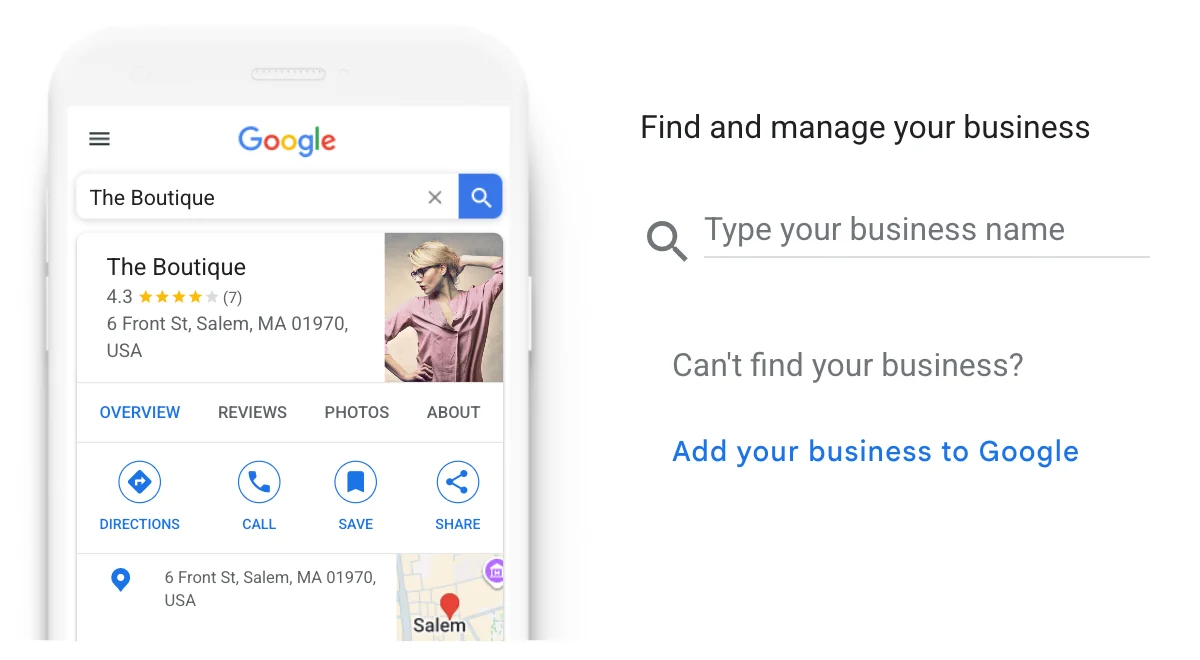
- Your business appears, unverified. Select it and claim it.
- It appears, managed by someone else. Request ownership.
- It doesn't appear. Select Add your business to Google.
How to create your profile, step by step
Use a computer for setup if you can, since reading each choice is easier on a larger screen.
- Enter your name and categoryType the name on your sign and pick the category for the work that earns the most.
- Answer the location questionSay yes only if customers visit your address during your hours, then enter it.
- Add service areasIf you travel to customers, list the cities or ZIP codes you cover, up to 20.
- Add your phone and websiteUse a local number your business controls and the page that matches this location.
- Verify the profilePick the method Google offers you and follow the steps on screen.
Google wants your service area to sit within roughly two hours' drive of your base. It can't be a radius around your address. Edits to your service area may need up to two days to show.
Storefront, service area or both
The location question sets how Google shows your address. Answer it based on how you work today.
| Profile type | Address on the profile | Fits businesses like |
|---|---|---|
| Storefront | Shown | Dental offices, law firms and clinics |
| Service area | Hidden | Pest control, house cleaning and pool service |
| Hybrid | Shown, plus service areas | An HVAC company with a showroom that also drives to homes |
If customers don't come to your address, Google says to remove it. Showing a home address for a business that only travels risks a suspension.
Verify your profile
Google picks which verification options you see, and you can't change the list. For most new profiles in 2026, the only option is a short video recorded on your phone. It shows where you are, that the business exists and that you run it, and Google reviews it within about 5 business days. Some profiles also see phone, text, email or a postcard.
What to fill in before customers see it
Verification turns your profile on. These details make it useful, so update them the same week. Link the profile to a matching service page, which our web design team can build for each main category.
- Hours, including holiday hours, set before the first holiday comes.
- Services, each written in the words your customers search.
- Photos of real jobs, your team, your trucks or your office.
- A website link with UTM tags, so you can track visits from Maps.
- A short description of what you do and where, with no links or prices.
Claim your Apple Maps listing the same week, since Apple Maps is the default map app on every iPhone.
Mistakes that get new profiles suspended
New profiles get more scrutiny than old ones. These are the most common reasons for trouble in the first month.
- Keywords in the name, like "Smith Plumbing Orlando Water Heaters".
- A virtual office address or a mailbox store as your location.
- A second profile for the same business at the same address.
- Reviews from friends or staff in the first weeks, which Google treats as fake.
- A video that doesn't match the name or address on your profile.
Once you add us as a manager, our Google Business Profile service sets up categories, services and photos.
Common questions about creating a Business Profile
Is a Google Business Profile free?
Yes. Creating and managing a profile costs nothing. Google charges only if you choose to run ads. A $1.99 monthly charge on your card is usually Google One storage on the same account, not the profile.
Do I need an LLC to create a Google Business Profile?
No. Google doesn't ask what kind of entity you are, so a sole proprietor can create a profile. What matters is that you meet customers in person and can prove the business is real during verification.
How long does Google Business Profile verification take?
Google finishes most reviews within 5 business days. A postcard, if you're offered one, can take up to 14 days.
Can I create a Business Profile without an address?
Yes. Choose service areas instead, and Google keeps your address hidden from customers.