
Apple Maps comes preinstalled on every iPhone and other Apple devices, and iPhones carry about half of US phone traffic. StatCounter put iOS at 53.6% of US mobile traffic in September 2026. In BrightLocal's 2026 survey, 27% of consumers read reviews on Apple Maps when choosing a local business.
Many businesses already appear on Apple Maps without ever signing up. Claiming the listing in Apple Business Connect, now called Apple Business, lets you control the name, hours, photos and action links people see. Apple says that information reaches customers across Apple Maps, Mail, Wallet, Siri and more, and place cards also show in Safari and Spotlight. Apple changed the tool for this in 2026, so older guides send you to screens that no longer exist.
What changed when Business Connect became Apple Business
Apple announced Apple Business on March 24, 2026, and launched it on April 14. It merged three older products into one free service. Those were Apple Business Connect, Apple Business Manager and Apple Business Essentials. The old Business Connect address now redirects to business.apple.com.
| What | Before April 14, 2026 | Now |
|---|---|---|
| Product name | Apple Business Connect | Apple Business |
| Web address | businessconnect.apple.com | business.apple.com |
| Claimed locations | Managed in Business Connect | Moved over automatically |
| Ads on Apple Maps | Not offered | Offered in the US and Canada |
If you claimed your listing before the switch, Apple moved your locations, place card details and photos at launch. Sign in at the new address and check that nothing is missing.
What you need before you sign up
Gather these before you start, since the sign-up runs in one sitting.
- An email address whose domain no other Apple Business account has verified.
- Your legal name as the person signing up, not a title like "Office Manager".
- Your website address, which Apple says can speed up verification.
- A business ID, such as your EIN or a D-U-N-S number, for verification.
Apple gives you 60 days after sign-up to verify your organization. After that, Apple deletes the organization and its data. Verification can take up to five business days, and longer in busy periods.
How to claim your business on Apple Maps
These steps follow Apple's own guide for adding a single location. Use a computer, since Apple runs the location tools in a web browser.
- Sign upGo to business.apple.com, select Sign up now, and enter your organization and personal details.
- Open LocationsIn the menu, go to Brands, then Locations, and select Add Location, then Add single location.
- Find and place itSearch your business name and select your listing, or add it new. Drag the pin onto your entrance.
- Add the detailsEnter the name, category, phone, website and hours, then pick or create your brand and logo.
- VerifyVerify your organization, or verify the location by phone where Apple offers that option.
If you open a new location within six months, choose Opening Soon as the status and set the date.
Several locations? Apple Business also takes them in bulk. Once Apple verifies your organization and you've added a brand, download the add multiple locations template. Fill in one row per location, then upload it. One file holds up to 10,000 rows, and Apple reviews the upload before the locations go live. Photos, Showcases and action links still go on each location one by one.
How Apple verifies your listing
Apple uses three routes, and the right one depends on whether your listing already exists and who manages it.
| Route | When you use it | What happens |
|---|---|---|
| Phone call | Your listing already shows on Apple Maps | Apple calls the number on record, and you type the four-digit code |
| Organization check | Your first location, before Apple has verified your organization | Apple reviews your business ID, domain or documents within five business days |
| Transfer request | Another company already manages your listing | You upload a business license or utility bill, and review takes up to five days |
The phone call goes to the number Apple already has, not one you type in. If that number is old or belongs to a former owner, contact Apple Business support.
Transfers come up more often than you'd think. A former agency or a listing service may still manage your listing from its own account. Request the transfer from the Status column on the Locations screen.
What to add after Apple verifies you
A bare listing shows a name and a pin. A full one gives people a reason to call or book. This mockup shows the parts you control.
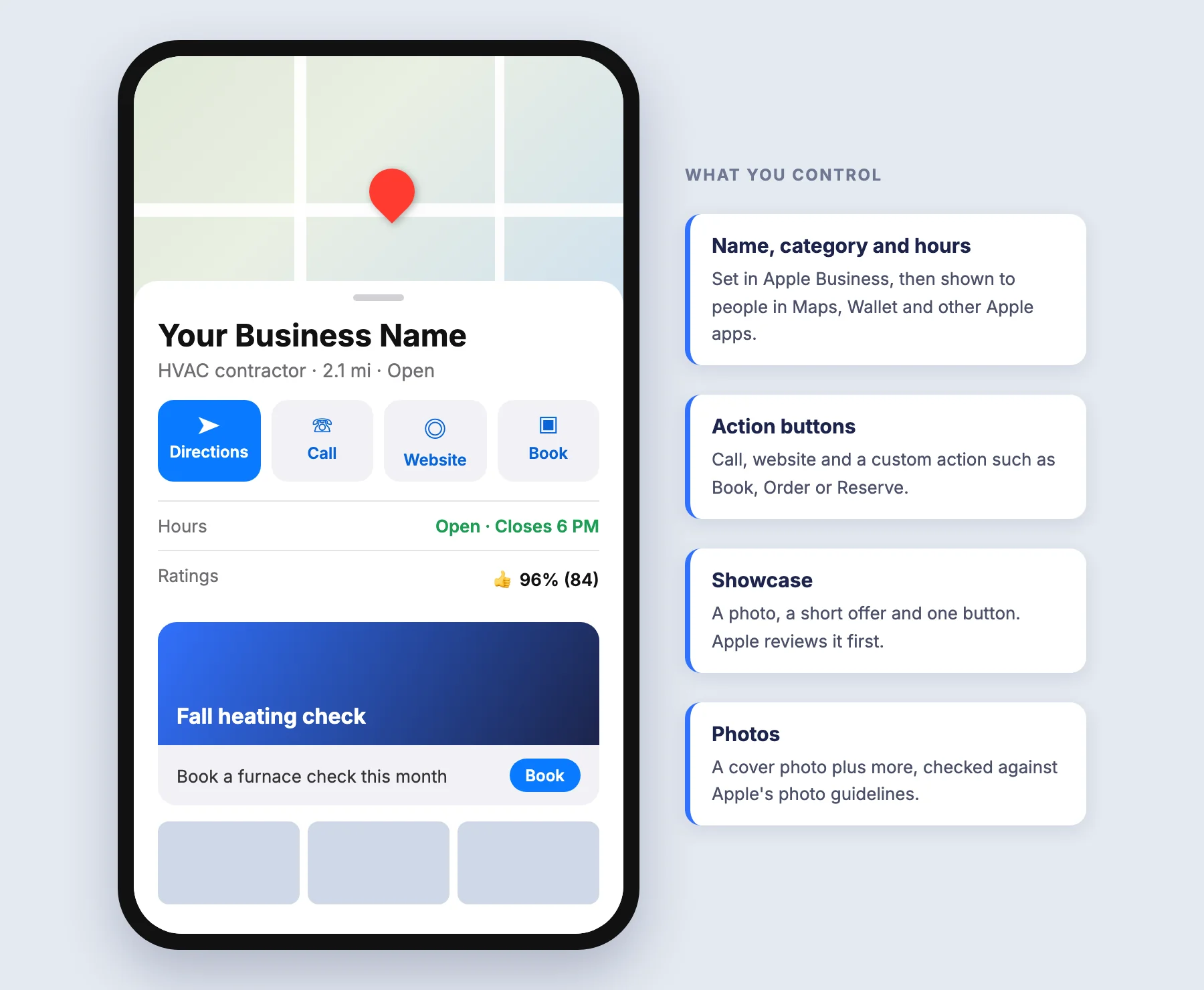
| Feature | What it does | Worth knowing |
|---|---|---|
| Photos | Adds a cover photo and more to your place card | Apple checks each one against its photo rules |
| Showcases | Puts a photo, a short offer and a button on the card | Apple reviews each one, so allow three days |
| Actions | Adds buttons such as Book, Order or Reserve | Each button opens your own booking or order page |
| Insights | Counts searches, views and taps on your listing | Data can take up to an hour to show after verification |
| Branded Mail | Shows your name and logo on emails you send | You verify your email domain with Apple first |
A Showcase runs 90 days by default and up to 365. Use it for seasonal offers, such as a spring AC tune-up or a holiday cleaning slot. Editing one during Apple's review can delay approval.
Insights reports run by day, week and month. A map ranks the top 10 ZIP codes where people start directions to you, which shows where your customers come from. Apple shows small counts as zero to protect privacy.
Ads on Apple Maps
Apple now sells ads inside Maps to businesses in the US and Canada. Ads appear in Suggested Places before someone searches, and in results after a search. You set the budget, and eligible new advertisers get a $150 credit.
Apple requires a claimed location before you can run ads, so finish the setup above first. Treat Maps ads as a test next to Google, not a replacement, since Apple has little cost data so far. Our Google Ads management team can help you compare cost per call across both.
Ratings, and keeping Apple Maps and Google in sync
Ratings on your place card come from Apple Maps users and partner sites, and you can't edit them in Apple Business. The way to improve them is the same as on Google, more happy customers who share how it went.
Customers check more than one map. When the hours or phone number differ, some of them call a closed office or a dead line. Copy your name, address, phone and hours from your Google Business Profile so both match word for word.
Google doesn't feed Apple Maps, so every change needs a second update. Our Google Business Profile management updates the Google side every week.
Our local SEO services keep your Apple, Google and Bing details matched across 50+ directories.
Common questions about Apple Business Connect
Is there a fee for Apple Business Connect?
No. Apple Business, which replaced it, is free. You pay only for extras like more iCloud storage, AppleCare or ads on Maps.
Is Apple Business Connect the same as Apple Maps?
No. Apple Maps is the app your customers use. Apple Business is where you manage what your listing shows inside it.
Is Apple Business Connect worth it?
Yes, for almost every local business. It's free, it takes about an hour to set up, and it controls what iPhone users see in Maps, Siri and Spotlight.
Do I need Apple Maps if I already have Google Business Profile?
Yes, if your customers use iPhones. The two listings don't share data, so each one needs its own upkeep.